Showing posts with label iReport. Show all posts

Thursday, 31 March 2011

Adding Sybase IQ driver to Jasper iReport

How to Add Sybase IQ to ireport 4 Linux.

Get jconnect60.jar (Sybase IQ Driver)
Put Driver into  /iReport-4.0.1/ireport/modules/ext/
In iReport go to Tools/Options
Go to iReport option
Go to Classpath tab
Click add JAR
Browse to find Driver in /iReport-4.0.1/ireport/modules/ext/
and select jconnect60.jar
Select ok.
Driver added.
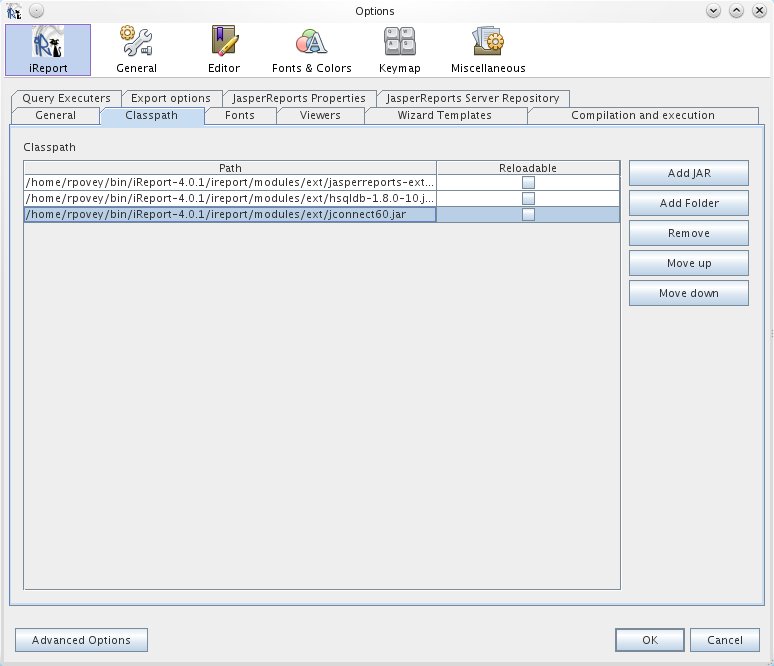


Now when you add data source

Use com.sybase.jdbc3.jdbc.SybDataSource as your jdbs Driver
and jdbc:sybase:Tds:localhost:2638/MYDATABASE as your URL


Thursday, 17 March 2011

Jasper iReport 4.0.1 fonts for linux

Okie dokie,

Well first tiny little blog showing how to add some java machine fonts for ubuntu linux (ubuntu 10 and above).

I had updated my machine to linux Mint 10 kde as well as updated iReport to 4.0.1.
When I opened a report I had created previously, I could not run the report as I was getting java errors in iReport :
net.sf.jasperreports.engine.util.JRFontNotFoundException: Font 'Arial' is not available to the JVM. See the Javadoc for more details.

A little research began and a solution was found.
It was quite basic to install.

You need to run this command : $sudo apt-get install msttcorefonts
Obviously you need to accept the questions during install
and then restart your Jasper iReport.

Now back to work...